

Find The Needle - Screenshot 1


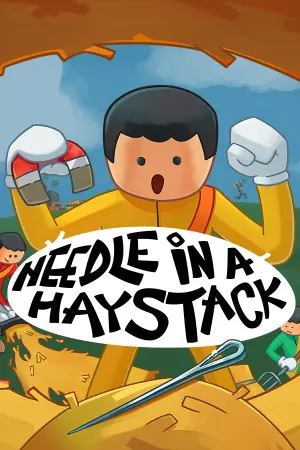
You have a shovel and a haystack with about six million strands in it. Somewhere inside there's a needle. Dig it out by hand, sell the hay, then spend the money on belts and machines until you don't have to dig anymore. You were a farmer. At least, you think you were. Now you're stuck inside a strange warehouse, standing in front of an endless haystack. You don't remember how you got here, who brought you here, or why the doors won't open.
There is only one instruction: Find the needles. There are some in the pile. You start by hand, with a metal detector. You end up with belts, balers, scanners and robotic arms doing the looking for you. Place real machines, wire the power, feed them by belt. Sell the hay, buy more machines, get given a bigger pile. Nobody has said what happens when you finish. Buy tools like shovels, buckets, wheelbarrows, pitchforks, vacuums. Anything that helps you process hay manually! Automate everything! Build robots, drones, conveyor belts, hay wrappers, paper machines, sorting machines, and advanced systems that process hay and search for needles while you focus on expanding your factory.
Turn ordinary hay into valuable products! Process it into hay pulp, compressed bales, eco bricks, hay paper, pellets, and much more. Build new production lines, unlock advanced machinery, and find better ways to turn your mountain of hay into profit. Progress through a huge tech tree with over 300 upgrades! Unlock new machines, improve production speed, increase efficiency, expand your factory, and discover entirely new ways to process hay.
- Who knows?


Step-by-step setup process
Please review these important details before installation
Install necessary apps from Redist or _CommonRedist to ensure game launches without any problems.
Always extract game in Antivirus / Defender excluded folder - Please check our FAQs to know why it is important.
Always run the game as administrator.
For detailed guide, make sure to read Installation Guide.txt inside the game files.
Minimum specifications needed
Community voices
Spot the sentiment at a glance, then dive into the stories that matter to you.
Average
/5recommend
0%
written
0
verified
0
Quick filters
Rating spread





Leaving AnkerGames
Your about to visit the following urlInvalid URL
Sign in to join the discussion · comment, reply and react
Discussion
Comments 7
Pinned by moderators
Carzed
Mod · editedIf you are getting no license error it means your antivirus ate the game files , delete game folder and follow the guide below
https://ankergames.net/article/installation-guide
marfeg
· editedi have all 15 of 15 files required , i have excluded the folder which i donwload , i have deleted and reinstalled but still the same issue with license error
posangmalungkot
· editedHi! I just have a general question. If i copy my files into another device, will i be able to play my saved files in the other device? Thanks!
Andrew
· editedKeeps trying to launch through steam and gives a no license error. Run Me! and launching through exe both net the same error.
Ollie
· editedSteam gives me a 'No License' error and won't launch the game.
RandomGames12345
· editedCant open the game because i dont have a license for it, gives me an error in steam
Lucelion0224
· editedcant play.