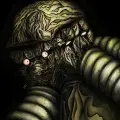

Project Zomboid - Screenshot 1



Project Zomboid is an open-ended zombie-infested sandbox. It asks one simple question – how will you die? In the towns of Muldraugh and West Point, survivors must loot houses, build defences and do their utmost to delay their inevitable death day by day. No help is coming – their continued survival relies on their own cunning, luck and ability to evade a relentless horde.
Hardcore Sandbox Zombie Survival Game with a focus on realistic survival. Online multiplayer survival with persistent player run servers.
Local 4 player split-screen co-op. Hundreds of zombies with swarm mechanics and in-depth visual and hearing systems. Full line of sight system and real-time lighting, sound and visibility mechanics. Hide in the shadows, keep quiet and keep the lights off at night, or at least hang sheets over the windows. Vast and growing map (loosely based on a real world location) for you to explore, loot and set up your fortress. Check out Blindcoder’s map project: Vehicles with full physics and deep and realistic gameplay mechanics. Use tools and items to craft weapons, barricade and cook. You can even build zombie proof forts by chopping trees, sawing wood and scavenging supplies. Baldur’s Gate 3
Deal with depression, boredom, hunger, thirst and illness while trying to survive. Day turns to night. The electricity falters. Hordes migrate. Winter draws in. Nature gradually starts to take over. Farming, fishing, carpentry, cooking, trapping, character customization, skills and perks that develop based on what you do in-game. Proper zombies that don’t run. (Unless you tell them to in the sandbox menu). A ton of amazing atmospheric music tracks by the prodigy that is Zach Beever. Imaginative Challenge scenarios and instant action ‘Last Stand’ mode, on top of regular Sandbox and Survival. Full, open and powerful Lua modding support. Xbox Controller Gamepad support on Windows. (Other gamepads can be set up manually.)


Step-by-step setup process
Please review these important details before installation
Install necessary apps from Redist or _CommonRedist to ensure game launches without any problems.
Always extract game in Antivirus / Defender excluded folder - Please check our FAQs to know why it is important.
Always run the game as administrator
For detailed guide, make sure to read Installation Guide.txt inside the game files.
Minimum specifications needed
This build ships with the online fix, so multiplayer and co-op work over the internet with friends running the same version — no extra patch to download. Everyone joins through the game's own lobby or invite system; keep the build identical on all machines when a new version is released. All games with an online fix
Community voices
Spot the sentiment at a glance, then dive into the stories that matter to you.
Average
/5recommend
95%
written
3
verified
6
Quick filters
Rating spread
Fresh off the press
Look for it at the top of the stream.
Pure cinema! Engaging and addictive game!
Great game
it's the best zombie survival sim.
the mods make it even better!

Leaving AnkerGames
Your about to visit the following urlInvalid URL
Sign in to join the discussion · comment, reply and react
Discussion
Comments 91
nizza123
how to download build or version 41 on here?, build 42 is too heavy for me
zloxlsz
· editedhow to install mod pls help me
DerekJimenez
how do i add a mods?
TAD
· editedi just extract the game already but i dont know how to install or launch the game
JP Jones
· editedHi, do I have to download the whole game file again for a version update or are there any patch installing methods? Thanks!
Alex
Hi! Is it possible to add version 4.21 for Linux or is the focus of the site only for Windows? It would be nice to have other options... because this is the best place to download games. Thanks
Aylaa
· editedhow to multiplayer?
Aylaa
· editedis multiplayer available?
Micheal Smith
how do i add mods
Al
· editedan error says when I try to extract the zip file
lumen
· editedwhat should I do when it say i have to have steam open to play
elvandion
how do i add mod on here?
matheus
· editedI can't play online. I can't connect to any server, and I can't even accept invitations from Steam friends who already own the game. Can you help me?
matheus
· editedI can't play online. I can't connect to any server, and I can't even accept invitations from Steam friends who already own the game. Can you help me?
bob
· editedi cant run the game i get error message 0x0e90007